
Your Source for DIY Pedal PCBs and NostalgiTone! › GuitarPCB Forum › GuitarPCB Build Support › Mini-Me Chorus not affecting (solved)
Tagged: Chorus, circuit, help, pedal build
- This topic has 55 replies, 7 voices, and was last updated 1 year, 8 months ago by
 Billy.

-
AuthorPosts
-
January 10, 2025 at 5:55 pm #34746BillyModerator
I’m sure you’ll figure it out Mason it’s basically a process of elimination
You know you’ve got 9v from your power supply into the DC jack if after you reflow solder joints its still faulty
I’d disconnect the jack completely, desolder your wires from it, plug power in and check what you get on the solder lugs that’ll at least confirm the jacks good or not then we’d know something in the circuit is dropping voltage
Where is the kit from
January 12, 2025 at 3:34 pm #34769AnonymousGuestThanks! The kit is the Mini-Me Chorus from Pedal Parts and Kits. I switched my DMM grounding point from one of the audio jacks to the DC jack and got 9V in, so I think the DC jack itself is fine. I’ll attach a new chart of the IC/Transistor values here:
January 12, 2025 at 9:22 pm #34772BillyModeratorDoes the voltage oscillate on the LM358 pins 1,5 and 7
Your 4558 voltages look high pin 4 should be 0v ground the others around 4.5v except pin 8 which should be power around 9v
What voltage do you get at the junction of R32 and 33 where they are connected on one side of R32 you should get around 9v on the other side around 4.5v and one side of R33 should be around 4.5v the other 0v
Which transistor is Q1,2 and 3 on your voltage diagram is this correct
January 12, 2025 at 11:01 pm #34774AnonymousGuestFor R32 I got 0 V and 6 V, for R33 I got 9 V and 6 V. Your transistor layout is correct. I am seeing oscillation on pins 1, 5, and 7 on LM358 but yes all my values for 4558D are high.
January 13, 2025 at 8:48 am #34775BillyModeratorPost an image of both sides of the pcb as it is now
I’m thinking even with a 6v bias voltage on the 4558 you should still get a mis biased sound through the pedal
Your grounding issue seems to be the cause of your incorrect voltages with the most likely candidate being the BBD jumpers
Obviously you should get 0v on Q1 emitter, pin 4 of the 4558 and pin 1 of the BBD ( I think) you’ve got 3v try reflowing the BBD jumpers
The LM358 ground is separate and that’s OK
Your voltage divider R32 and 33 appears to be working and both look to be the correct value 56K
Take voltages on the 4558 socket with the IC removed I’d expect pin 4 to still be 3v indicating a problem on that ground plane
January 13, 2025 at 11:52 am #34777mybudModeratorHere are my voltages as promised. Seems to me the big discrepancy is the 4558, where you’re getting positive readings on the right hand side of the chip and I’m around 0 as you see. Try maybe first checking for any shorts at or near that socket, then replace the chip if possible.
What worries me is the different readings when you first measured from jack ground to the later ones measured from ground on the DC jack.
I’m not sure whether or not the audio ground and the power ground are on separate planes. Correction, Billy confirms this above.
This may mean that my 358 voltages are wrong since I measured everything from audio ground. Unfortunately I don’t have a simple way of accessing separate grounds the way I’ve built mine.
Have you tried adjusting the trimmer now that you’re getting the correct voltage from the power supply? Wish I could be of more use…
January 13, 2025 at 10:03 pm #34784AnonymousGuestYou’ve both been great helps so far! I am a bit clueless as to the specifics of building these kits this one has just been giving me trouble. I’ll attach pictures here and take measurements of the 4558 IC socket soon. I did try adjusting the trimmer but it didn’t seem to have any effect.
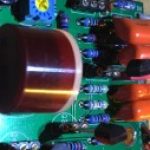
January 13, 2025 at 10:43 pm #34785BillyModeratorWhat’s the piece of wire near R6 coming from the under the BBD make sure you snip off any excess like that if it is part of the jumper it’s hard to tell if it’s actually touching R6 solder joint
January 13, 2025 at 11:31 pm #34786AnonymousGuestI trimmed off whatever excess I could, not sure if I got what you were seeing:
I tested the 4558D socket and got 5, 5, 5, 0, 5, 5, 5, 9
January 14, 2025 at 2:31 pm #34792BillyModeratorJanuary 15, 2025 at 8:19 am #34795AnonymousGuestI think that was a bit of wire left over from when I was making the jumpers. It’s gone now but I’m still not getting any effect through the pedal. Adjusting the trimmer doesn’t make any difference. Again, the 4558D socket readings were 5, 5, 5, 0, 5, 5, 5, 9 and the pin readings on the 4558D itself are 6, 6, 6, 3, 9, 6, 6, 6. Do I just need to get a replacement 4558D?
January 15, 2025 at 12:27 pm #34797mybudModeratorWorth bearing in mind that there’s a fairly narrow spot in which the trimmer functions. I suggest playing through the engaged pedal and adjusting the trimmer in really small increments. It seems that the 4558 is functioning since you’re getting sound with it. If this doesn’t work, double-check your component values are correct and reflow any cold joints you may come across. Finally, an audio probe (there’s info on it on the site) helps to isolate any missteps and narrow down problem areas. We’ll get to the bottom of this in time.
January 19, 2025 at 10:58 am #34826CybercowParticipantOnce you voltages are corrected, you’ll want to focus on that internal trimpot. The sweet spot for that trimpot is a very narrow and us=ually somewhere around 11:00 on the dial. Move it in tiny increments while testing for the effect.
January 20, 2025 at 12:53 am #34832AnonymousGuestSo I was out of town for a few days and came back to it suddenly working. The trimmer pot was about in the center of its rotation, but once I got everything back into the casing it stopped working again. I’ve been trying adjusting the trimmer but it just doesn’t seem to be working. No idea what made it suddenly start and then stop working
January 20, 2025 at 1:59 am #34833mybudModeratorWell, that’s progress in one sense that you got it working for a while. Unboxed but switched on, try gently tapping each component with a pencil or similar: I suspect a loose connection or a cold solder joint somewhere. Maybe start with the trimmer and work from there.
This troubleshooting exercise is very good for learning how to fault find: I’ve had to do this more times than I care to admit 🙂 If it works unboxed and ceases when you box it, you may be inadvertently shorting something in the boxing process but let’s get the unhoused version up and running first.
Keep at it. Your perseverance will reward you with a great-sounding pedal in the long run.
January 20, 2025 at 9:00 am #34834AnonymousGuestOkay, thanks! What should I be listening for when tapping the components?
January 20, 2025 at 9:15 am #34835mybudModeratorHere we’re trying to identify if there’s a loose connection somewhere on the board. The fact that it’s intermittent (suddenly working and then not) points to this. BUT if it’s consistently working outside the box, then the problem is either the offboard wiring or something shorting against the enclosure. To clarify, does it work consistently unboxed (IOW, no loss of chorus or dry signal until you house it)?
-
AuthorPosts





- You must be logged in to reply to this topic.